 PAFworks
Build your own module with Claude
A module is a small application made for your organisation — an equipment loan register, a visitor log, a price list — that your team opens from the left bar of PAFworks. Claude Code writes it, tests it and deploys it. Nothing it asks for works until an administrator approves it.
How it works
A module is a small web application (Python and Flask) written for your space by its administrators — in practice, by Claude Code on their behalf. PAFworks runs each module apart from everything else, in a jail of its own, and shows it in the left bar at an address such as https://cloud.example.com/mods/loans/.
Modules others have already written can also be installed in a click: see Install modules from the Store.
Everything a module uses is declared in its module.json file. Claude Code deploys it through a connector of its own, the modules connector; an administrator then approves, on the module's page, what it may do.
Before you start
- An administrator account. Turning modules on, connecting Claude Code and approving are for administrators only. Your users only use the modules you publish.
- Modules on your PAFworks. They need a module host on the server. If Modules does not appear in your administration, ask your provider.
- Claude Code on your computer, and an empty folder for the module.
- To test a module on your computer before deploying it: Python 3.11 or later with the Flask and Waitress packages.
Step 1 — Turn modules on
Click Admin in the left bar, then Modules in the list (it carries an Experimental tag).
-
Click Turn modules on. The switch shows On.
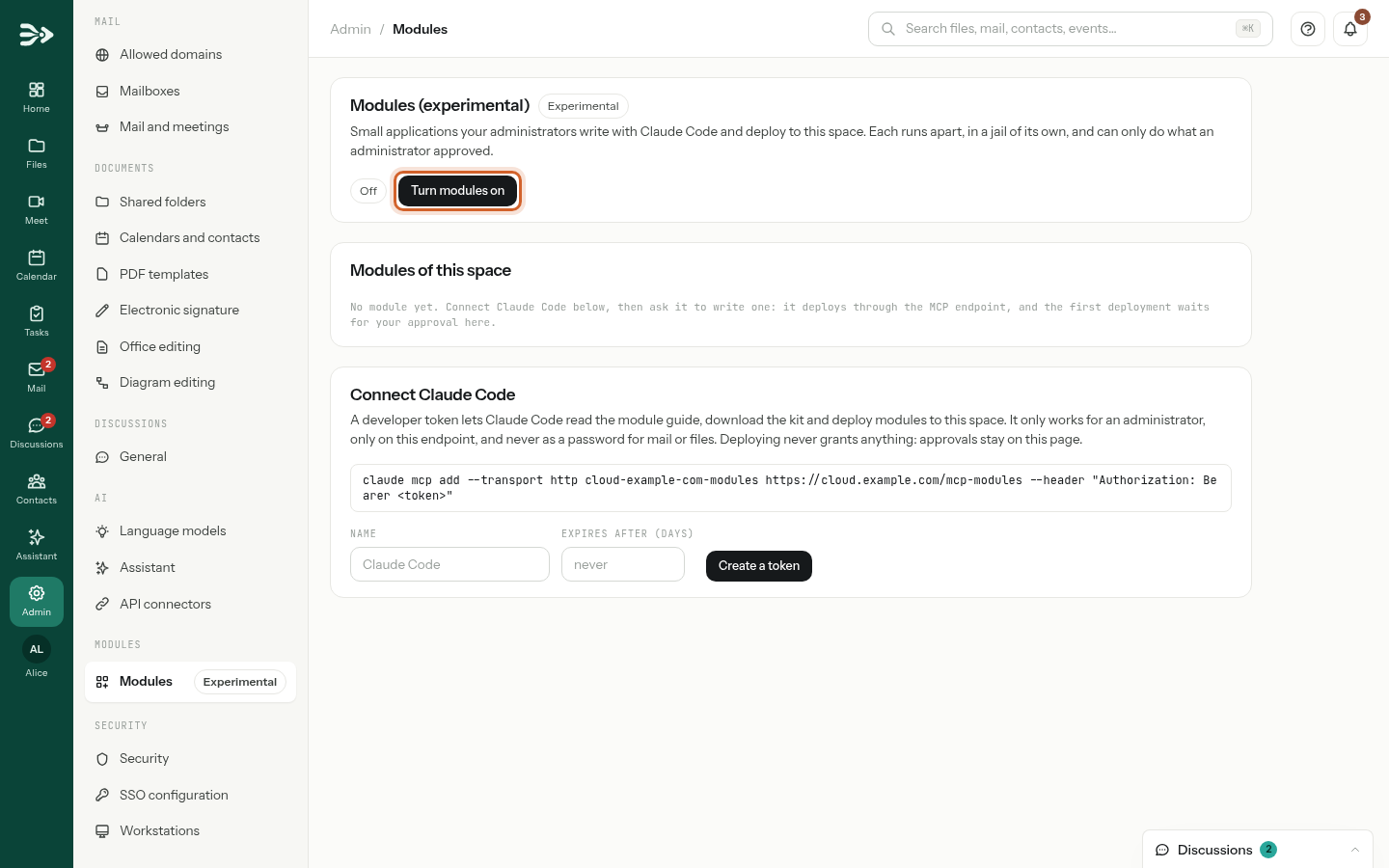
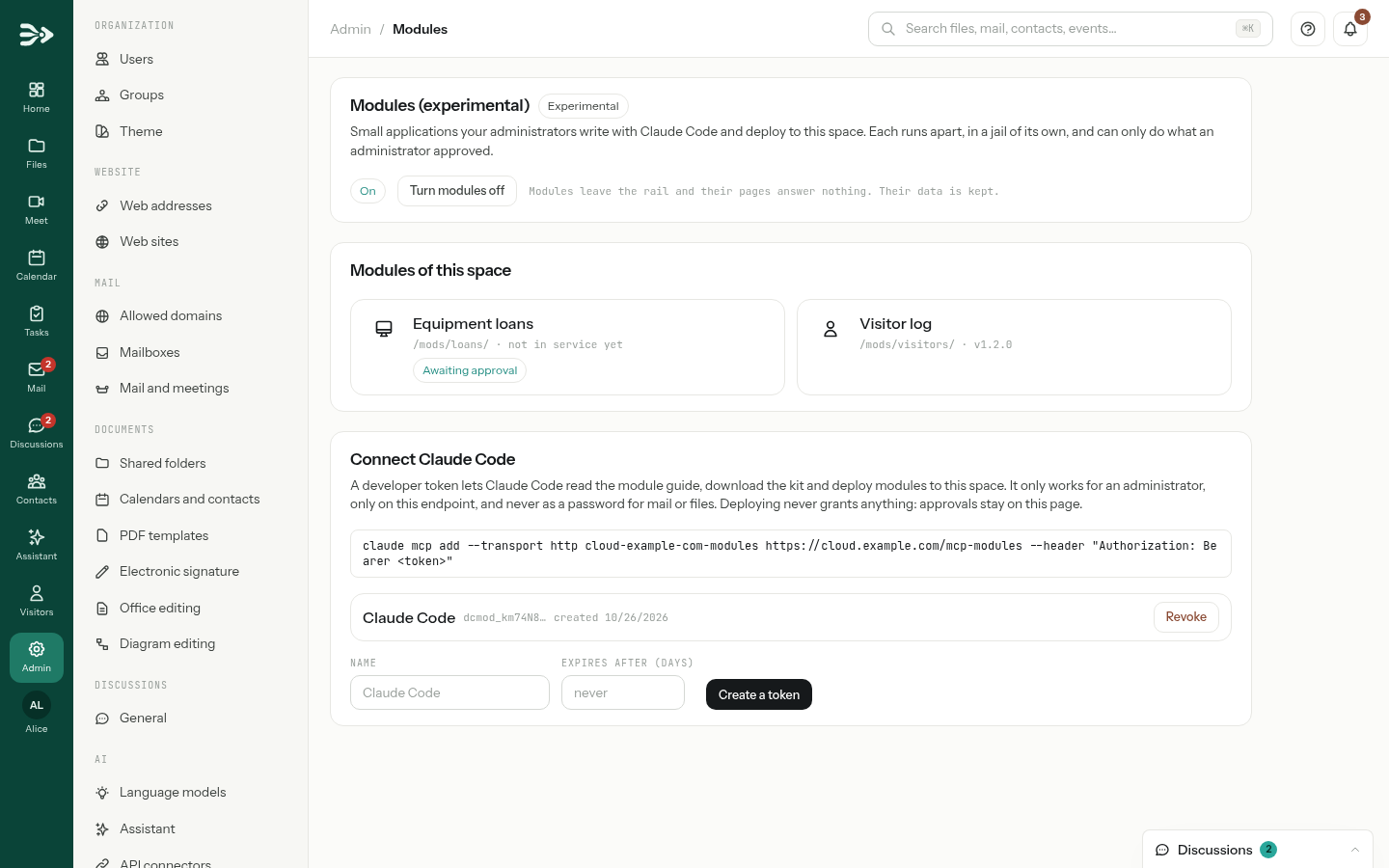
Modules are turned on for your whole space. Turn modules off takes them all out of the left bar later: their pages answer nothing and their scheduled tasks stop, but their data is kept.
The Modules page then holds three parts: the switch; Modules of this space, a card per module with its address, its version and tags such as Awaiting approval, Inactive or Last deployment failed — click a card to open the module's own page; and Connect Claude Code, with your developer tokens. Deleted modules appears below when there are some.
Step 2 — Connect Claude Code
Claude Code signs in to the modules connector with a developer token: a key of its own, which works only for an administrator, only for modules, and never as a password for mail or files.
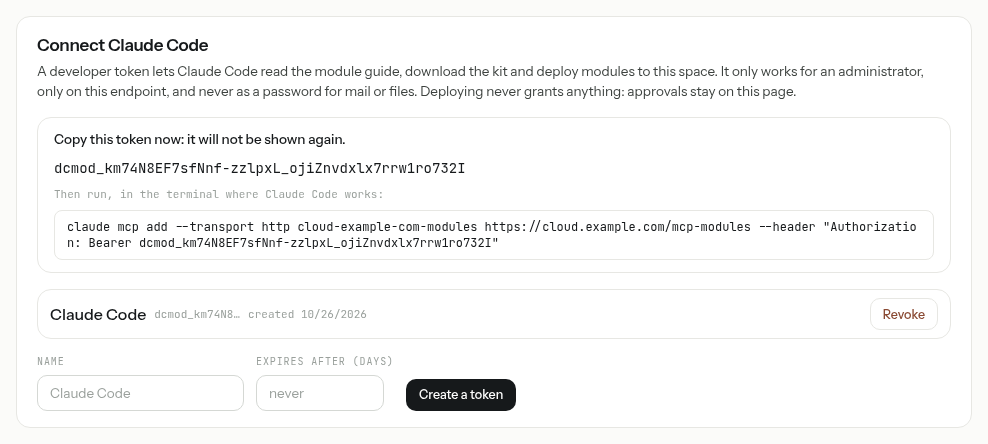
In Connect Claude Code, on the same page, type a Name (
Claude Codeif you leave it empty). To limit the token in time, type a number of days in Expires after (days); empty, it never expires. Click Create a token.-
Copy the token now: it is shown only once. Below it, the page gives the command to run in the terminal where Claude Code works, token included.
-
Run that command in a terminal, from the folder where you will build your modules. It looks like this:
claude mcp add --transport http cloud-example-com-modules https://cloud.example.com/mcp-modules --header "Authorization: Bearer dcmod_…"
Lost the token? Create another one, then click Revoke next to the old one: Claude Code loses that access at once. Each administrator sees and revokes their own tokens.
Not the usual PAFworks connector. The connector that gives Claude your files, mail and calendars (see Use PAFworks from Claude and other AI apps) has another address and takes an app password. The modules connector, at /mcp-modules, takes a developer token only: an app password does not work there, and a developer token opens neither your files nor your mail.
Why Claude Code, and not claude.ai? To build and deploy, Claude runs commands in the module's folder on your computer: it downloads the kit, runs the module locally and sends each version from there. A conversation on claude.ai cannot run them on your computer, and the page gives the Claude Code command only.
Step 3 — Ask Claude for a module
Start Claude Code in an empty folder and describe what you need in your own words: what the module shows, what people do in it, and what should happen on its own. For example:
“Build a PAFworks module called Equipment loans. It lists our equipment — laptops, a projector, a camera, a tripod — with who has borrowed each item and when it is due back. Add a form to lend an item, a Returned button and an Excel export. Every morning at 8:00, notify whoever recorded a loan that is now overdue. Read the module guide first, test the module locally with dcmod-dev, then deploy it.”
Claude turns this into a module that declares what it needs — for this one, sending notifications in PAFworks and a scheduled task. Its pages look like the rest of PAFworks and follow your organisation's colours.
Step 4 — Claude builds, tests and deploys
You can watch each step in Claude Code. The tools of the modules connector are named in brackets.
It reads the module guide (
module_guide): the rules of a module, the toolkit it is written with, the design rules, the catalogue of actions, recipes, and how deployment works.It downloads the kit (
get_module_kit): the toolkit, the local test runnerdcmod-dev, a working skeleton to start from and aCLAUDE.mdfile of rules. The tool answers with a command, valid for 10 minutes, that Claude runs in your folder.It writes the module:
module.json, the application, its page templates and the files that create its database.It tests it on your computer with
dcmod-dev: it checks, as a deployment does, that the database changes apply and that the module starts, then opens its pages in a local copy of PAFworks, screenshots included. Mail never leavesdcmod-dev.It deploys it (
deploy_module): one more command, run in the module's folder, packs the folder, checks its fingerprint and sends it to your space.It reads the report (
module_status): deployed, failed — with the file and line at fault — or awaiting approval. A failed deployment never replaces the version in service: Claude fixes the code and deploys again. A first deployment always waits for you: Claude tells you so.
To find a problem, Claude reads the module's logs (module_logs) and opens its pages itself (call_module): as you, as a guest of a workspace, or as a visitor who is not signed in. rollback_module goes back to the previous version, after saying which data would be lost.
Local tests with your token use your account. When dcmod-dev runs the module with your developer token, the actions the module declares are carried out in your space, as you: a task it creates during a test is a real task. dcmod-dev --offline uses sample data instead.
What Claude cannot do. Deploying never grants anything. Approving, opening a gateway to the internet, mail or AI, changing a module's address, typing a secret and deleting a module are only ever done by an administrator, in the web interface. So are turning modules on, creating tokens, choosing who may use a module and placing it in a workspace.
Step 5 — Approve the first deployment
-
Open Admin › Modules. Under Modules of this space, the new module shows Awaiting approval and not in service yet. Click it.
-
Read the top of the page: the version waiting, when and by whom it was sent, and What this module uses, in plain words — here, Sends notifications and the scheduled task
overdue. What the version in service did not already use is marked new: on a first deployment, everything.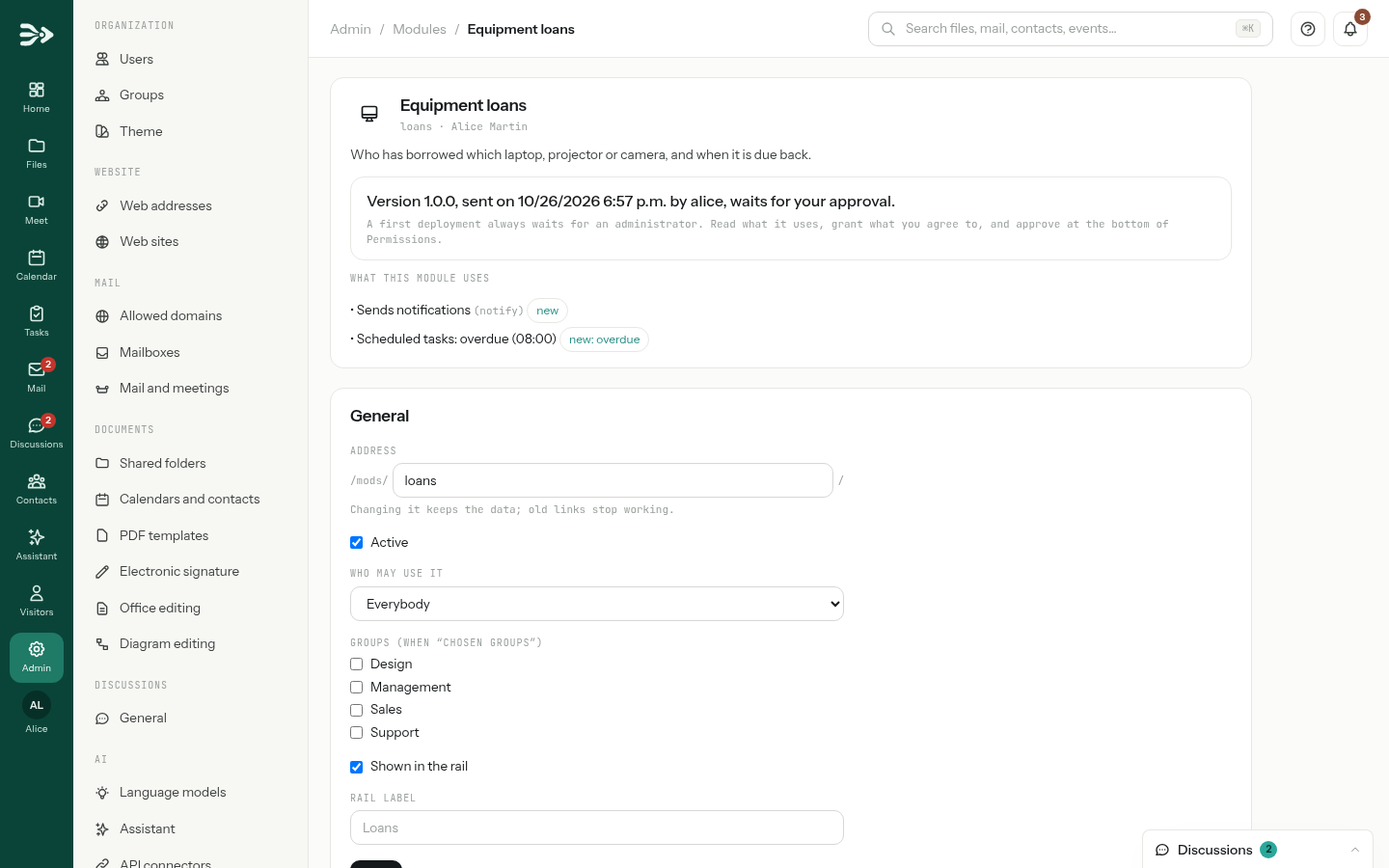
-
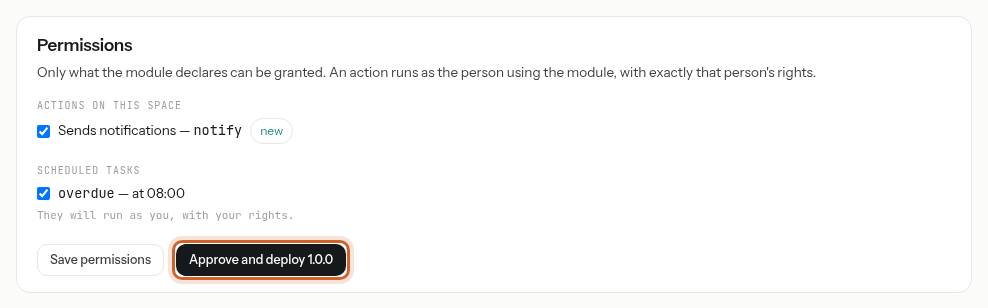
Under Permissions, tick what you agree to. Only what the module declares is offered. A scheduled task runs as the administrator who turns it on, with that administrator's rights. Click Approve and deploy 1.0.0.
-
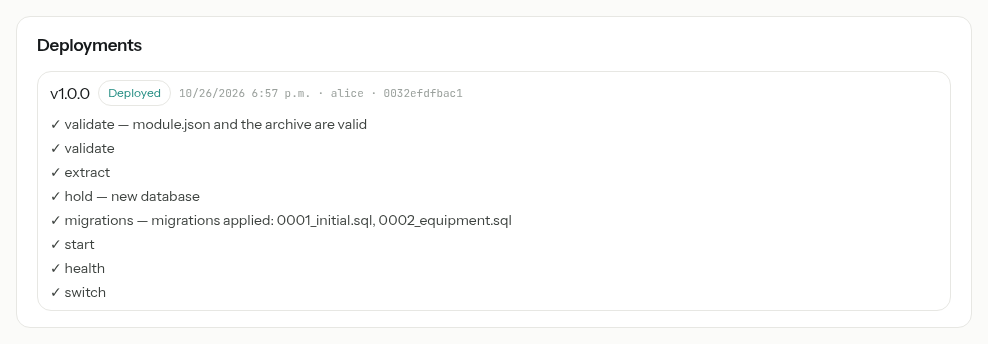
The deployment starts. Its report appears under Deployments: every step ticked, from the checks of the archive to the switch to the new version. The module is now in service.
An action you leave unticked is refused when the module calls it. Later, Save permissions changes what a module in service may do, without deploying anything.
What your users see
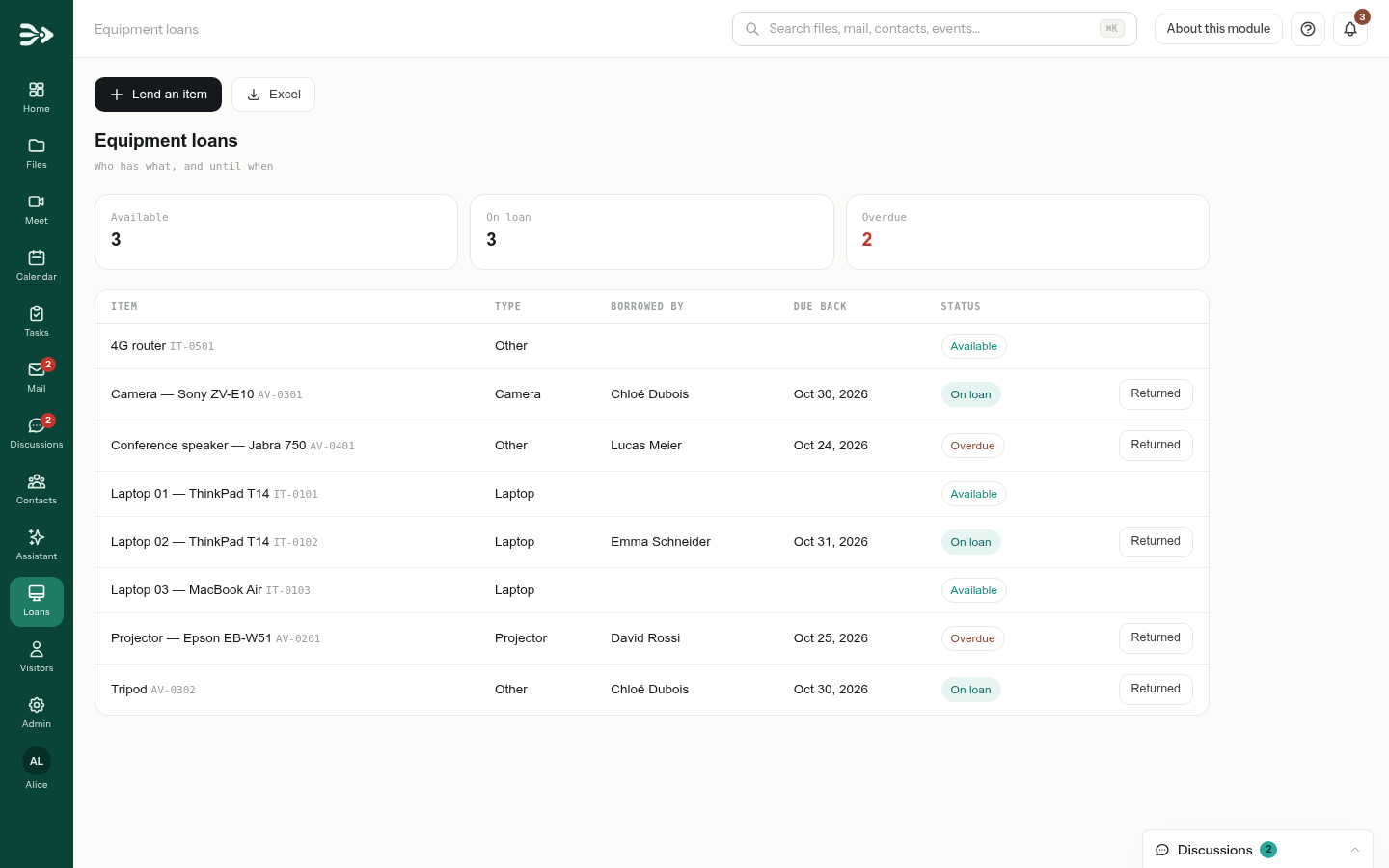
The module appears in the left bar, with its own icon and label, for the people allowed to use it. It opens inside PAFworks, in your organisation's colours.
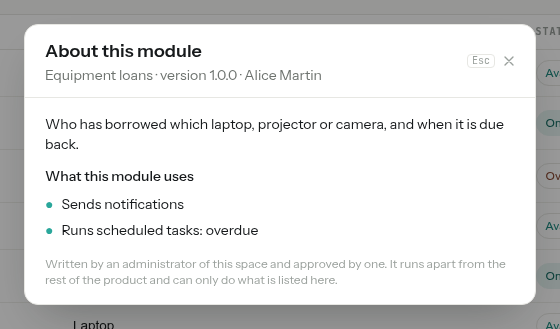
About this module, at the top right, lists what it uses and whether each item was approved.
- It acts as the person using it. Everything a module does in your space — reading a contact, creating a task — it does with exactly the rights of the person in front of it. The changes it makes to files show in their activity as made “via the module”.
- Artificial intelligence is announced. When a module may send what users type to a language model, a banner says so above it.
- A module that cannot answer shows a short message inside its page; the rest of PAFworks is not affected.
Choose who uses it
The General section of the module's page decides where it lives and who sees it. Click Save after a change.
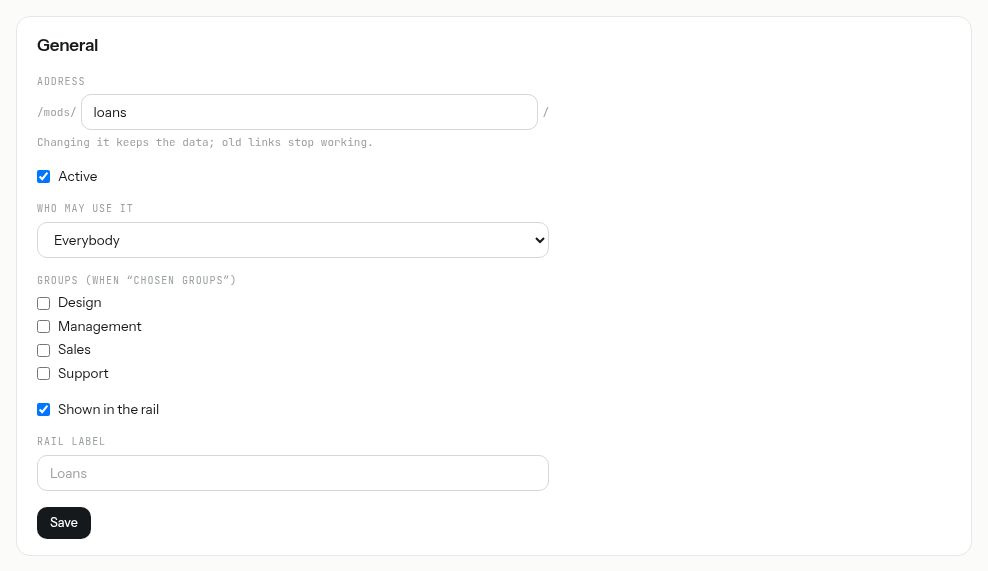
| Setting | What it does |
|---|---|
| Address | The end of /mods/…/. Changing it keeps the data; old links stop working. |
| Active | Untick it to take the module offline without deleting it: it leaves the left bar and its pages answer nothing. |
| Who may use it | Everybody, Chosen groups (tick them below) or Administrators only. Administrators can always open a module. |
| Shown in the rail | Untick it to keep the module out of the left bar; it still opens from its address. |
| Rail label | The name under its icon in the left bar, instead of the one the module chose. |
What a module can ask for
A module declares in module.json everything it uses. What it does not declare does not work and is not offered for approval; what it declares does not work until you grant it under Permissions.
| Declared | What the module gets | What you decide on its page |
|---|---|---|
| Actions | Reading or changing files, contacts, calendars and tasks; reading mail and writing drafts; reading forms and their answers; sending notifications; making PDF documents. As the person using the module. | Each action, under Actions on this space. |
| Internet | Calls to services on the internet. | Internet: public addresses only, 10 MiB per answer, 600 requests per hour, every call logged. |
| Sending mail outside your space. | Mail: the allowed senders, on a domain verified under Allowed domains, and the default sender. 100 messages per hour, 1,000 per day. | |
| Artificial intelligence | Questions to a language model. Never for workspace guests or visitors. | Artificial intelligence: a model of Language models that has a price (see Set up the assistant for your organisation), and a monthly ceiling in its currency. Administrators are notified at 80 % and 100 %; once it is reached, the module's AI answers nothing until next month or until you raise it. |
| Scheduled tasks | Work done on its own, every 5 or 15 minutes, every hour, every day or at a set time. | Each task, under Scheduled tasks. It runs as the administrator who turned it on. |
| Public pages | Pages anyone can open without signing in, and webhooks for other services. | Public pages and webhooks: a captcha on forms and a rate limit; the web sites allowed to embed them; whether search engines may index them. |
| Workspace pages | Pages for the guests of a workspace. | Pages for workspace guests, then, under In workspaces, a Workspace and a Page, and Place in a workspace. Guests find it among the Applications of their workspace. |
| Secrets | Keys of other services, such as a payment provider. | Secrets: typed on the page only, stored encrypted, never shown again and never sent through a conversation with a model. |
Pages for workspace guests. Keeping one client's data away from another depends on the module itself, which must filter everything by workspace. PAFworks cannot check it: test such a page as each guest before placing it.
Update a module
Ask Claude for the change in the same folder. It deploys a new version the same way.
- Nothing new asked for: the new version goes into service at once, without your approval. A version that asks for less needs none either.
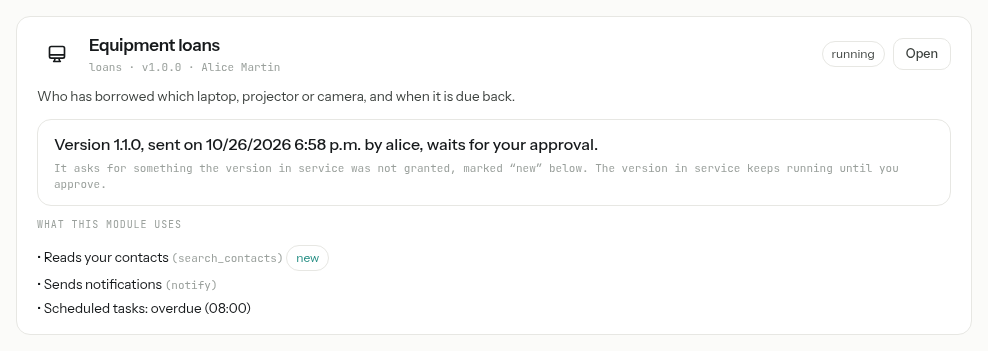
- Something new asked for — an action, a gateway, a scheduled task, a public page, a workspace page or a secret: the version waits for an administrator, and the version in service keeps running until you approve. The page marks what is new.
- One waiting version at a time: a later deployment replaces the one waiting.
- The data comes along. The new version's database changes run on a copy first: a deployment that fails at any step leaves the version in service and its data as they were.
Watch, roll back, restore
Lower on the module's page:
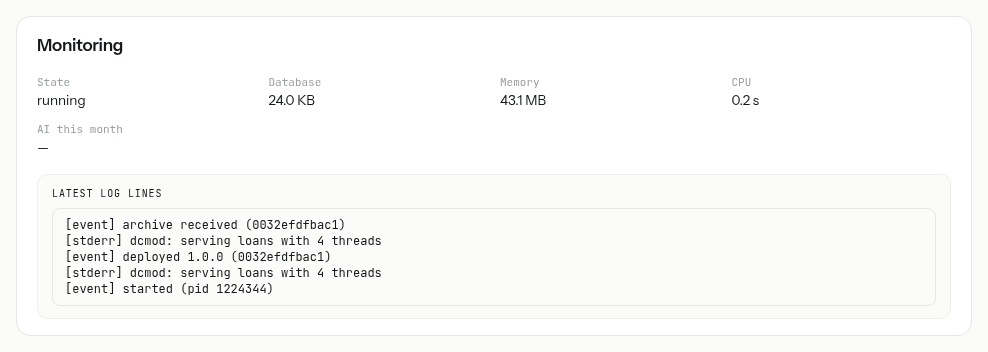
- Monitoring: its state, the size of its database, its memory and processor use, what its AI cost this month, and Latest log lines. stopped is normal for a module nobody used for a while: it starts again at the next visit. failed follows three crashes in ten minutes, until the next deployment or a change of its settings.
- Deployments: every version sent, with its report — steps, errors with file and line, warnings.
- Roll back to the previous version, shown once there is one, goes back to the previous version and to its database: every change made since the current version was deployed is lost. Claude can do the same with
rollback_module, after telling you what would be lost. - Copies of the data: PAFworks copies the module's database every hour when it changed, and keeps the last 24 copies and one a day for 14 days. Restore puts a copy back; everything written since is lost.
- Erase the data, under Reset the data, starts the version in service on an empty database. A copy is taken first, so it can be restored.
Delete a module
At the bottom of the module's page, click Delete this module and confirm. It leaves the left bar at once. Its data is kept, and you can bring it back with Restore under Deleted modules on the Modules page for 30 days; then it is erased for good.
Good to know
- Experimental, and an option of the server. Without a module host, the administration has no Modules entry, and neither the pages nor the connector exist. Ask your provider.
- Ceilings. By default, a space holds up to 20 modules; a module gets 256 MB of memory unless it asks for more (512 MB at most) and a database of up to 512 MB; a version sent weighs at most 20 MiB. Your provider sets these limits.
- A jail of its own. A module cannot open a network connection, start a program or read anything but its own files and data. The internet, mail and AI only go through the gateways you open.
- Keep the module's folder. Its source code stays on your computer: PAFworks keeps the versions it runs, but the web interface offers no download of them. A Git repository is a good home for it.
- Developer tokens are stored as fingerprints only. A token stops working when it expires or is revoked, when its owner is no longer an active administrator, and while modules are turned off.
- Short-lived commands. The commands Claude is handed to download the kit and to send a version work for 10 minutes; after that, it asks the connector for fresh ones.
- Scheduled tasks run 5 minutes at most, never twice at once, and are skipped if the administrator who turned them on is no longer one.