 PAFworks
Install modules from the Store
Besides the modules you build with Claude, your space can install ready-made ones: published by Iabsis or by another publisher, checked before anything is installed, and kept up to date for you if you wish.
How it works
A publisher puts its modules in a repository: a folder on a web server with a list of the modules, called the index, and their archives. Two signatures protect what you install:
- The publisher signs each version of its modules with its own key.
- The repository signs its index, which says which publishers it holds and which module belongs to whom.
PAFworks knows the keys of the repositories it reads, and checks both signatures before it shows or installs anything. Someone who broke into the web server could take a module away, but could not slip in a version of their own: it would not carry the right signature. Once a module is installed, PAFworks remembers its publisher's key, and a version signed by another key waits for you, even if updates are automatic.
A module from the Store is a module like the others: it runs in its own jail, does only what its page lists, and appears in the left bar. Everything in Build your own module with Claude about permissions, who may use it, monitoring, copies of the data and deletion applies to it too.
Before you start
- An administrator account, and modules turned on for your space (Admin › Modules › Turn modules on).
- A repository. Your provider may already offer some to every space; you can also add one yourself (see Add a publisher's repository). For a module bought as a file, no repository is needed.
The Store page
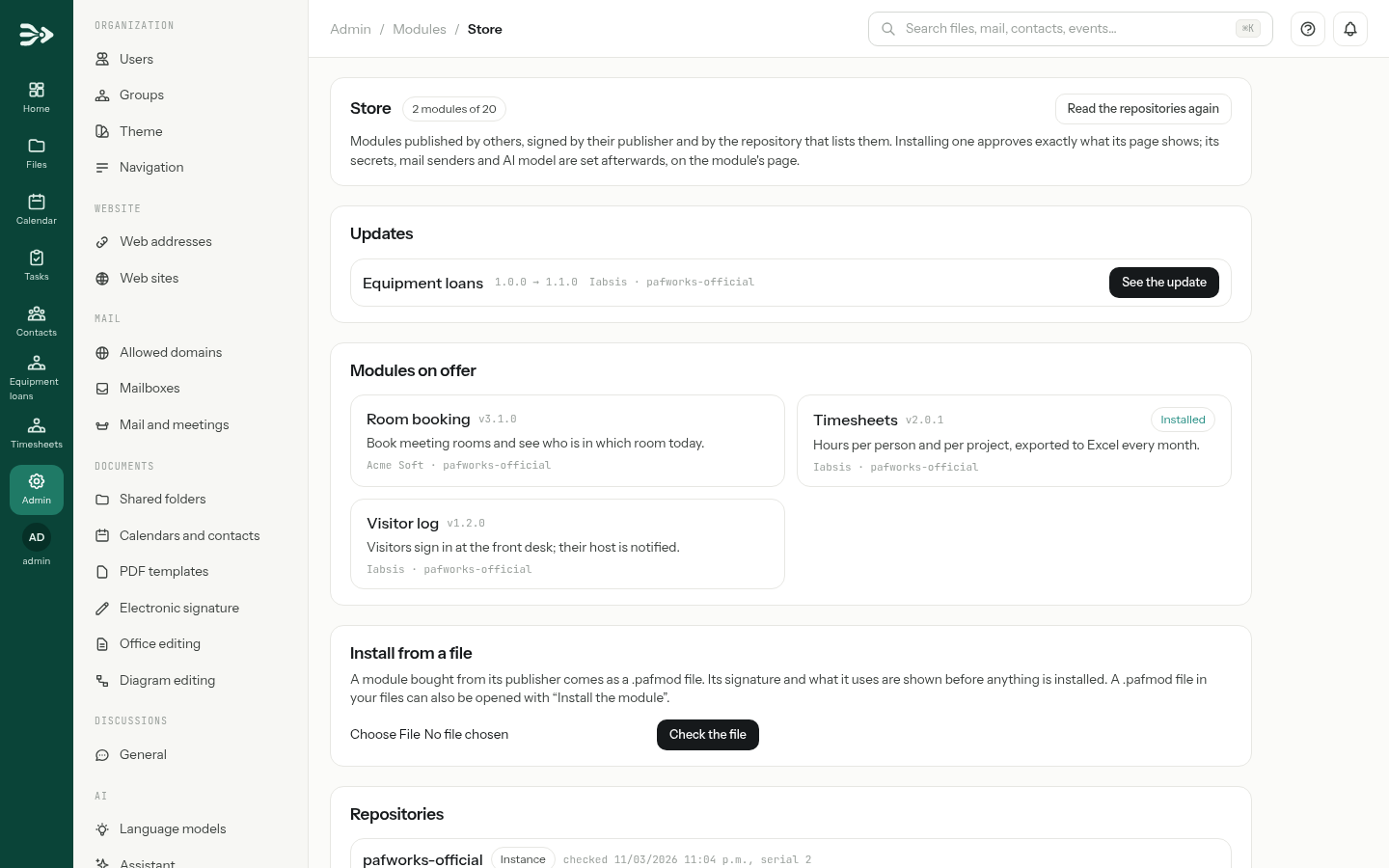
Open Admin › Modules and click Store, at the top right of the module list. The page holds, from top to bottom:
- The count, such as 3 modules of 20: modules installed from the Store count like the others. At the limit, nothing more can be installed; updates still are.
- Updates, when a newer version of an installed module is out, each with See the update.
- Modules on offer: one card per module, with its version, its publisher and its repository. A card can carry Installed, Deleted here (it is among the deleted modules of your space) or Another module has this id (a module of yours, or of another publisher, already uses that name).
- Install from a file, for a module bought as a
.pafmodfile. - Repositories: each one the Store reads, tagged Instance when your provider offers it or This space when an administrator of your space added it, with when it was last checked and the fingerprints of its keys. When a repository cannot be read, its error appears here.
PAFworks reads the repositories every hour. Read the repositories again does it at once.
Install a module
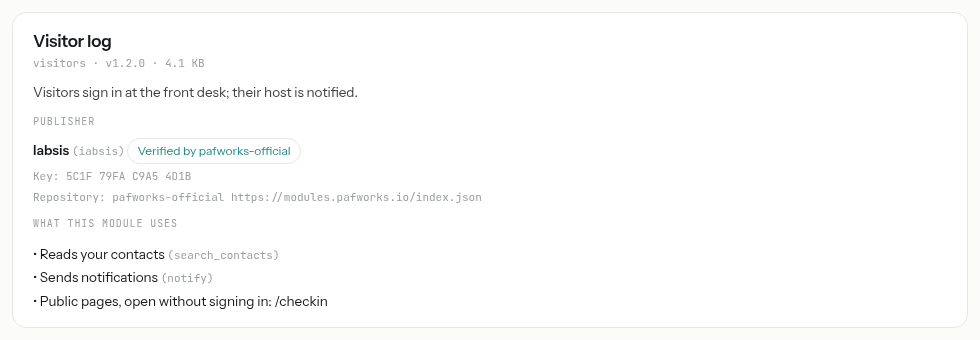
Click a card under Modules on offer. Its page shows, before anything is downloaded:
- Publisher: its name, the fingerprint of its key and Verified by the repository that lists it. For a repository added by your space, who added it.
- What this module uses: the actions, gateways (internet, mail, AI), scheduled tasks, public pages, workspace pages, assistant tools and secrets it declares. Nothing outside its own data when it uses none.
- Changes, when the publisher wrote what is new.
Under Updates, choose how its later versions arrive (see Updates). Manual is selected by default.
Click Install. PAFworks downloads the archive, checks its fingerprint and the publisher's signature, and refuses it if it asks for anything the page did not show.
You land on the module's page. Set there what can only come from you: its secrets, its mail senders, its AI model and budget, its address and who may use it.
Installing approves what the page lists. Unlike a module deployed by Claude, there is no second approval step: the click on Install is it. To withdraw an action afterwards, untick it under Permissions on the module's page and click Save permissions.
Updates
Each module installed from a repository has an update policy, chosen when you install it and changed later in the Origin section of its page:
| Policy | What happens when a new version is out |
|---|---|
| Manual | The administrators get a notification, and the version appears under Updates on the Store page. Open it and click Update to …. |
| Automatic | The new version goes into service on its own, within the hour, when it asks for nothing new. |
Whatever the policy, a version waits for an administrator, with a notification, when:
- it asks for something new — an action, a gateway, a scheduled task, a page, a secret. The update page marks it new, and the version in service keeps running meanwhile;
- it is signed by another key of the publisher. The page then asks you to tick that you expected the publisher to change keys. If you did not, do not update: ask the publisher.
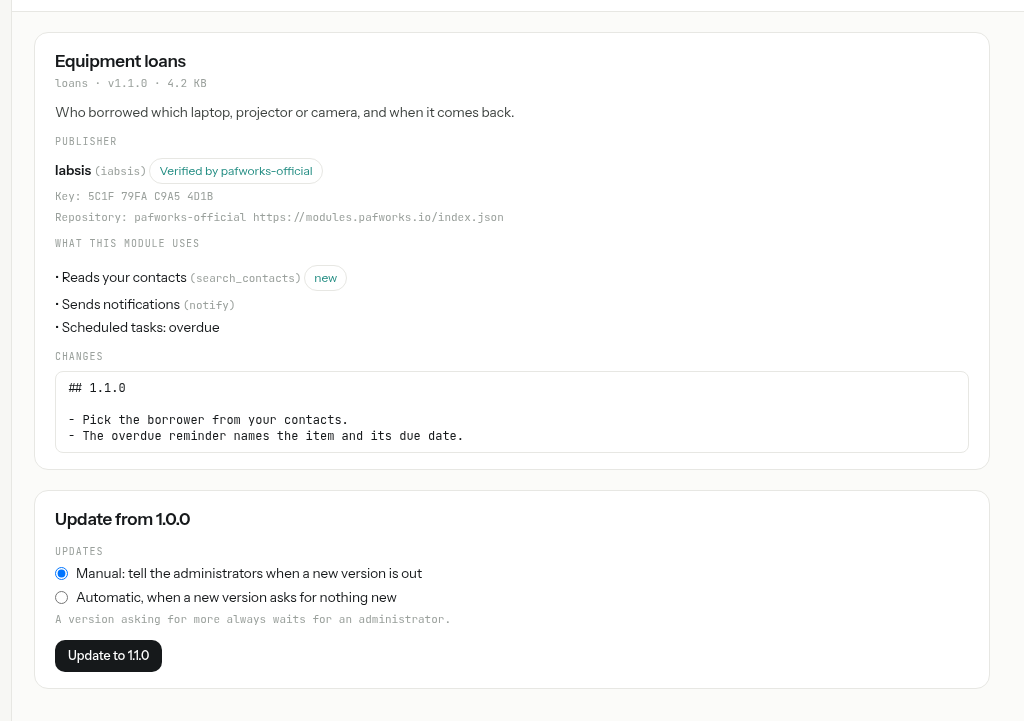
The module's data comes along, as with any new version: its database changes run on a copy first, and a failed update leaves the version in service untouched. The Store never goes back to an older version; to undo an update, use Roll back to the previous version on the module's page.
Install a module bought as a file
A paid module is not in a public repository: its publisher sells you a file ending in .pafmod, made for your organisation. It holds the module and a statement signed by the publisher, with your licence.
Either, on the Store page under Install from a file, choose the file and click Check the file; or, if the file is in your PAFworks files — received by mail and saved, for instance — open it with Install the module.
The same page as for a repository appears, with a Licence section: who it is licensed to, for which domains, until when.
- Verified by … when a repository your space reads knows the publisher's key.
- Publisher not verified otherwise. The signature then proves only that nobody altered the file since it was signed, not who signed it: install it only if you got it from the publisher yourself.
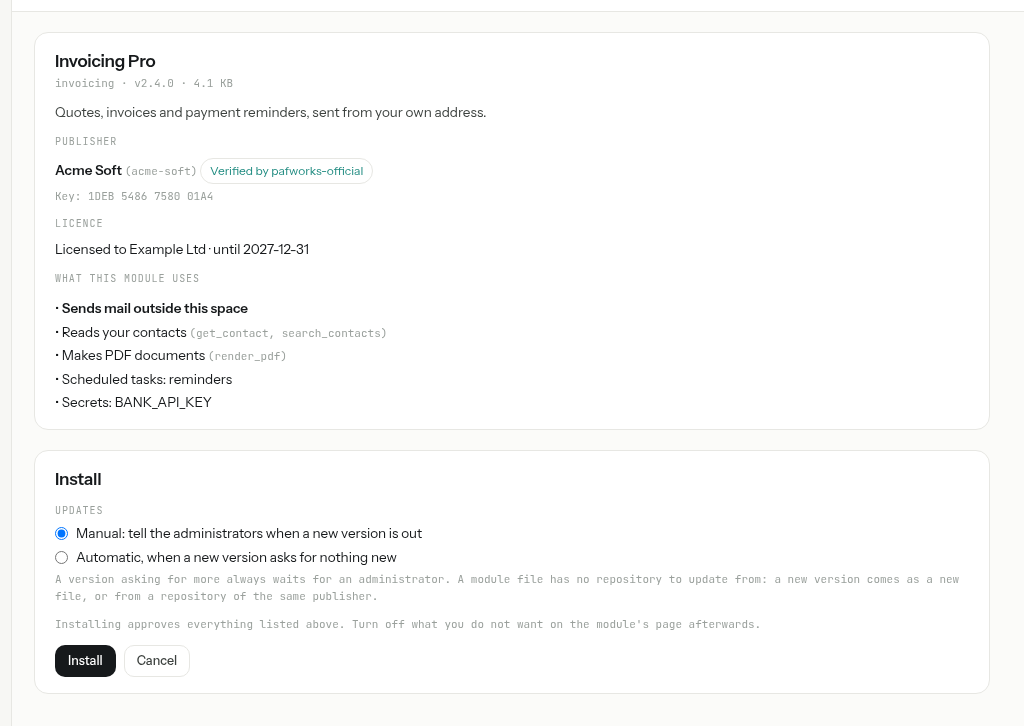
Click Install, or Cancel.
- What is installed is what you checked. PAFworks keeps a copy of the file when it shows the page; a file changed in the meantime installs nothing new.
- The licence. A licence for given domains installs only in a space where one of them is verified. An expired licence refuses installs and updates, but never stops a module already installed.
- Updates of a module installed from a file come as a new file from the publisher, installed the same way. If the publisher also has a repository your space reads, its versions are offered too.
- Install the module only appears to administrators, in their own files; for everyone else a
.pafmodis a file like another.
Add a publisher's repository
A publisher who is not in the repositories your provider offers can give you the address of its own. Adding it makes its modules appear in the Store of your space only.
Ask the publisher for the address of its index (it ends in
index.json) and its public keys, usually two: the current one and a spare. Get them through a channel you trust — its web site, a signed contract — not from an unknown mail.On the Store page, under Repositories, fill in URL of the index and Public keys, one per line. Click Add the repository.
PAFworks reads it at once. If its index is not signed by one of the keys you typed, nothing from it is shown, and the error says why.
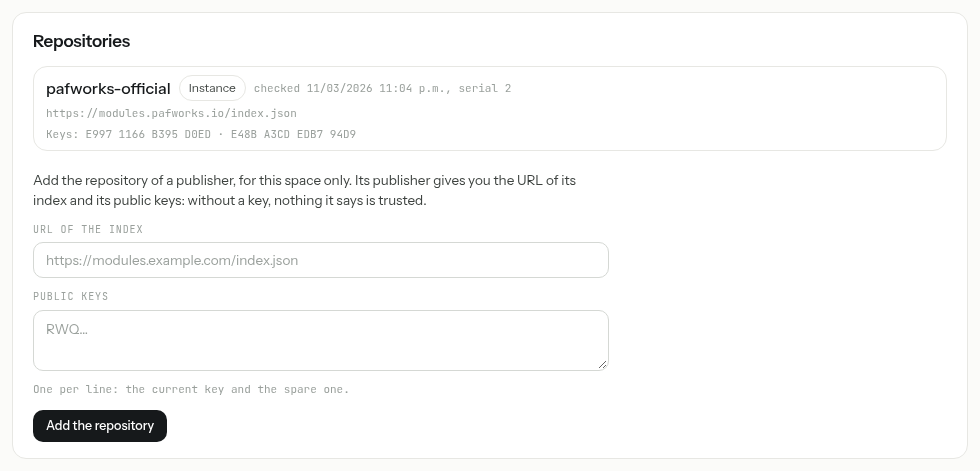
Remove takes a repository away; the modules installed from it stay, without updates. The repositories your provider offers cannot be removed.
You decide whom to trust. Iabsis does not review the repositories a space adds. Adding one means trusting its publisher with what you approve when you install its modules — no more, since each module stays in its jail with only the rights its page showed.
A module's origin, and detaching it
The page of a module installed from the Store has an Origin section: where it came from, its publisher and who verified it, its licence, and its update policy.
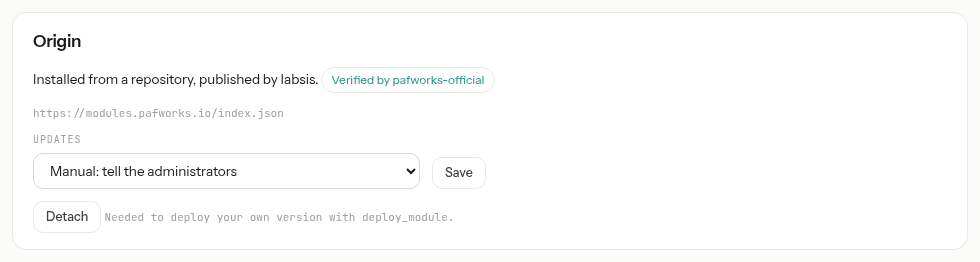
Such a module only accepts versions signed by its publisher: Claude cannot replace it with deploy_module. To take it over — to make your own changes to it — click Detach. It keeps its data, stops receiving the publisher's updates, and accepts your deployments like a module of your own. Detaching cannot be undone from the page.
What your provider decides
The server's operator sets, for every space on it:
- The repositories offered to every space, such as Iabsis's.
- Whether a space may add its own repositories, or use repositories at all. When it is not allowed, the form or the list of modules disappears from the Store page, and a line says so. Modules already installed keep running.
- Whether module files are accepted from any publisher, or only from publishers that one of the repositories it offers knows. In the second case, a
.pafmodfrom an unverified publisher is refused.
For operators, these are MODULES_REPOSITORY_URLS, MODULES_REPOSITORIES (all, instance, none) and MODULES_PACKAGES (all, verified), described in .env.example. A repository without a key, or an unknown value, stops the server at start-up with a message.
For publishers
The module kit (get_module_kit) holds dcmod-repo, the tool to publish modules. It needs Python 3.11 or later and the cryptography package.
Make your keys, on a computer you trust:
dcmod-repo key new acmewritesacme.key(secret) andacme.pub. Make a spare pair as well, and keep it offline: without it, a lost key means asking every customer to type a new one.Start a repository:
dcmod-repo repo init public/ --name acme-modules, then declare yourself as its publisher withdcmod-repo repo publisher public/ --id acme --name "Acme" --key <pub> --key <spare pub>. The repository has keys of its own, separate from the publisher's.Publish from a folder holding one folder per module:
dcmod-repo publish modules/ --repo public/ --publisher acme --publisher-key acme.key --repo-key repo.keybuilds each new version, signs it and signs the index. A published version never changes: the same version number with another content is refused.Put
public/on any web server, archives first andindex.jsonlast, and give your customers its address and the repository's two public keys.Sign the index again regularly: it expires after 30 days, and an expired index installs and updates nothing.
dcmod-repo publish … --resignpushes the date back even when nothing is new.
To sell a module as a file: dcmod-repo pack my-module/ --publisher acme --key acme.key --licensee "Example Ltd" --domain example.com --expires 2027-12-31 writes a .pafmod for that customer. dcmod-repo repo verify public/ --key <pub> checks a repository as a PAFworks server would.
To be listed in the official PAFworks repository, contact Iabsis: you keep signing your versions with your own key, and Iabsis reviews them before signing the index that lists them.
Good to know
- One name, one module. A module installed from a repository is never replaced by a module of the same name from another repository or publisher, nor by a module of your own; the card says Another module has this id.
- A repository out of reach stops neither PAFworks nor the modules installed from it: the Store keeps the last list it could check and shows the error.
- A licence is not a lock. The module runs on your server; its licence says who it was sold to, and the publisher decides what else to check from within the module.
- Size. A module file weighs at most a little over 20 MiB, the limit of a module version, unless your provider set another.